Amazon Bedrock Embedding
Amazon Bedrock provides managed access to foundation embedding models from leading providers — Amazon Titan and Cohere — that convert text into dense numerical vectors for semantic search, classification, and retrieval-augmented generation. With Unstract's Bedrock embedding adapter you can use these models in your prompt and indexing pipelines without provisioning any embedding infrastructure yourself.
- Amazon Titan Embed Text v2 —
amazon.titan-embed-text-v2:0(the schema default; recommended for most use cases) - Amazon Titan Embed Text v1 —
amazon.titan-embed-text-v1 - Cohere Embed English v3 —
cohere.embed-english-v3 - Cohere Embed Multilingual v3 —
cohere.embed-multilingual-v3
See the Bedrock supported models documentation for the full list and per-region availability.
Pre-requisites
- Active AWS account.
- The AWS user, role, or Bedrock API key you use must have permission to call
bedrock:InvokeModelon the embedding model you plan to use (andbedrock:InvokeModelWithResponseStreamif your workflow streams). - For models served from AWS Marketplace, a user with AWS Marketplace permissions must invoke the model once to enable it account-wide.
The Model access page in Amazon Bedrock has been retired. Serverless foundation models — including the Titan embedding models — are automatically enabled across all AWS commercial regions when first invoked in your account. You no longer need to manually activate model access.
Choosing an Authentication Type
When configuring a Bedrock Embedding adapter in Unstract, the Authentication Type dropdown offers three options. Pick the one that matches how your Unstract deployment is hosted:
| Option | When to use | What you supply |
|---|---|---|
| Access Keys | Any deployment (cloud or on-prem) where you have a long-lived AWS Access Key ID and Secret. | AWS Access Key ID, AWS Secret Access Key, Region. |
| IAM Role / Instance Profile (on-prem AWS only) | Unstract is hosted on AWS infrastructure with ambient credentials — EKS pods using IRSA, ECS tasks with a task role, or EC2 instances with an instance profile. | Region only. boto3 resolves credentials from the host's identity. Requires Unstract v0.159.3 or later — see the AWS IRSA Setup guide. |
| Bedrock API Key (Bearer Token) | You want to authenticate with an AWS Bedrock API key (AWS_BEARER_TOKEN_BEDROCK) instead of provisioning an IAM user — a simpler credential to issue and rotate. Long-term keys only — short-term keys are not supported (Unstract does not refresh the token). | Bedrock API Key (long-term), Region. |
Bedrock API keys are issued per region. The AWS Region you select in Unstract must match the region the key was issued for, otherwise AWS will reject the request.
The credential-gathering steps are identical to those for the Bedrock LLM adapter. The sections below summarise each option and link to the LLM doc for the full AWS console walkthroughs.
Option A — AWS Access Keys
Create an IAM user with programmatic access and a policy that allows bedrock:InvokeModel on the embedding model you intend to use. For the embedding models above the model ARN looks like:
arn:aws:bedrock:<region>::foundation-model/amazon.titan-embed-text-v2:0
Follow the Bedrock LLM adapter Option A walkthrough for the full step-by-step IAM user creation flow — the procedure is identical; only the model ARN in the policy Resource field changes.
Option B — IAM Role / Instance Profile
This option is only valid when Unstract itself is hosted on AWS infrastructure that already has an identity attached (EKS pods with IRSA, ECS tasks with a task role, or EC2 instances with an instance profile). No credentials are entered in the Unstract UI; boto3 picks up the host's identity from the standard AWS credential chain and Bedrock requests are signed automatically.
For the end-to-end EKS setup — OIDC provider, trust policy, IAM role, and service account annotation — follow the AWS IRSA Setup guide. The IAM role attached to the pod needs the same bedrock:InvokeModel permission on the embedding model ARN described in Option A.
The IAM Role / Instance Profile option requires Unstract v0.159.3 or later.
Option C — Bedrock API Key (Bearer Token)
AWS issues Bedrock API keys that authenticate via a single Authorization: Bearer <token> header — no IAM user, no SigV4 signing. This is the AWS-recommended path for workflows that need a simpler credential than long-lived access keys.
The Bedrock API Key (Bearer Token) option is available from the next on-prem release after v0.162.0 (and on Unstract Cloud once the same SDK version rolls out).
Unstract stores the Bedrock API key as static adapter metadata and does not auto-refresh it. The bearer token must therefore be a long-term API key.
Short-term API keys are not supported — they expire when the AWS console session that minted them ends (12 hours by default), after which every Bedrock call from Unstract will fail with a 401. Adapters configured with a short-term key will silently stop working once the key expires.
Step 1: Generate a long-term Bedrock API Key
- Sign in to the AWS Management Console and open Amazon Bedrock.
- Switch to the AWS Region you intend to call Bedrock from — API keys are region-scoped, so the key must be issued in the same region you will configure in Unstract.
- From the Bedrock left sidebar, open the API keys page.
- Open the Long-term API keys tab and click Generate long-term API keys.
- Set an expiry that fits your rotation policy and confirm.
- Copy the displayed key. AWS shows the secret value only once.
For more details, see the AWS guide on Generating Amazon Bedrock API keys.
Step 2: Ensure the underlying IAM identity has Bedrock permissions
A Bedrock API key inherits the permissions of the IAM user or role that created it. The IAM identity needs at minimum bedrock:InvokeModel on the embedding models you plan to use — see the policy examples in Bedrock LLM adapter, Option A Step 2, substituting the embedding model ARN in the Resource field.
Step 3: Store the API Key Securely
Treat the Bedrock API key like any other long-form secret: store it in AWS Secrets Manager, a CI secret store, or your password manager. You will paste it into the Unstract UI in the next section — in the Bedrock API Key field shown below:
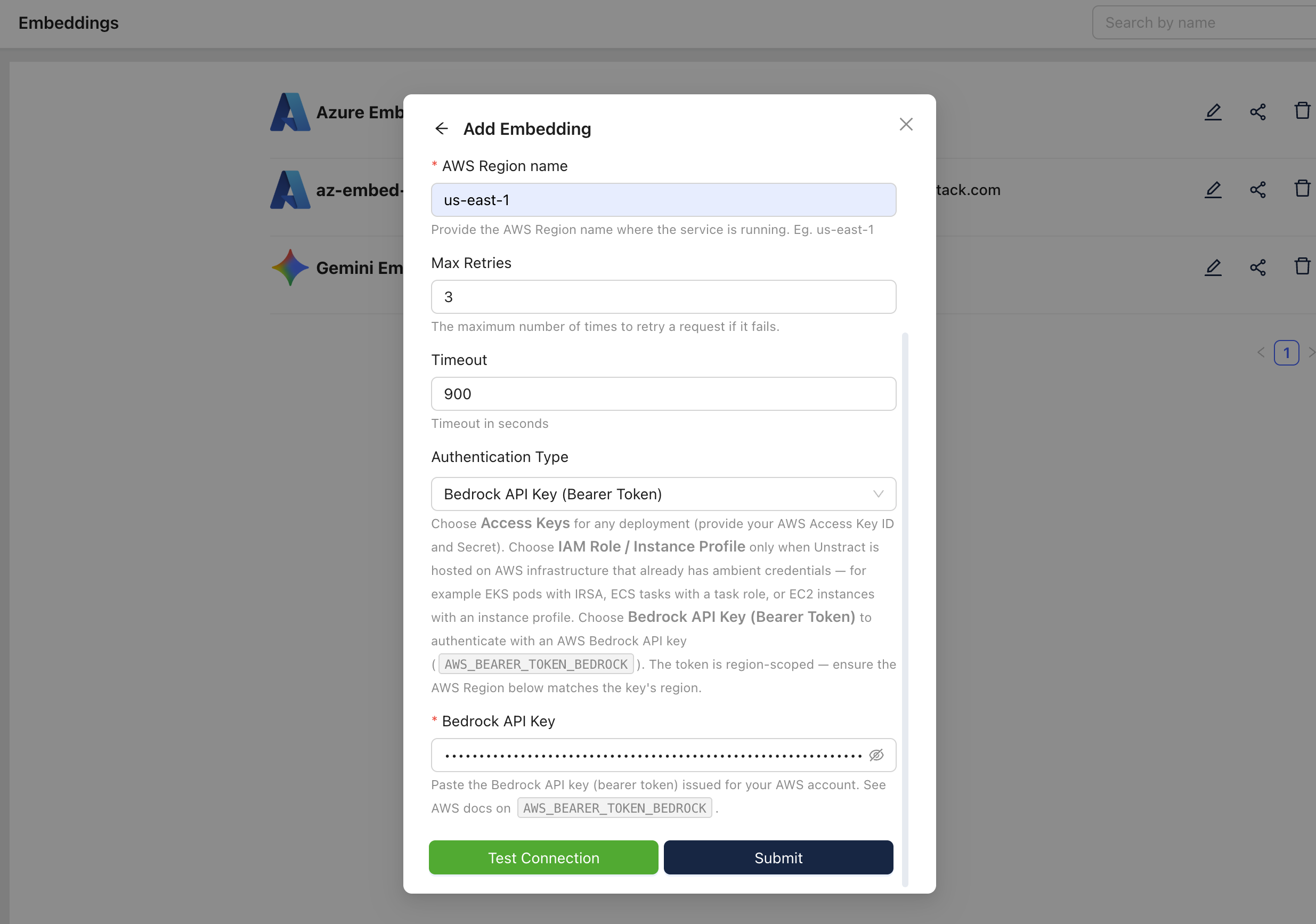
Setting up the Bedrock Embedding model in Unstract
Now that you have credentials, set up the embedding profile on the Unstract platform:
-
Sign in to the Unstract Platform.
-
From the side navigation menu, choose
Settings🞂Embedding. -
Click on the
New Embedding Profilebutton. -
From the list of Embeddings, choose
Bedrock. You should see a dialog box where you enter details. -
For
Name, enter a unique name for this adapter instance — e.g.,Bedrock-Embedding-1. -
In the
Modelfield, enter the Bedrock embedding model name (default and recommended:amazon.titan-embed-text-v2:0). See the Bedrock supported models documentation for the full list. -
For
AWS Region name, enter the region your model (or Bedrock API key) is provisioned in — e.g.,us-east-1. -
Leave
Max RetriesandTimeoutat their default values unless you have specific requirements. -
For
Authentication Type, pick the option that matches your setup:- Access Keys — paste the AWS Access Key ID and AWS Secret Access Key generated in Option A.
- IAM Role / Instance Profile (on-prem AWS only) — no further input needed; the host's IAM identity is used automatically. See Option B.
- Bedrock API Key (Bearer Token) — paste the key generated in Option C into the Bedrock API Key field. Make sure the AWS Region name above matches the key's region.
-
Click on
Test Connectionand ensure it succeeds. You can finally click onSubmitand that should create a new Embedding Profile for use in your Unstract projects.
The same three Authentication Type options are available for the Amazon Bedrock LLM adapter. The fields and behaviour are identical — only the model list differs.