Retrieve Approved Results
This feature is available in Unstract Cloud Edition and Unstract On-Premise Edition.
After documents are approved in the HITL workflow (either manually by supervisors or automatically through Auto Approval), you can retrieve the approved results through the API if your workflow is configured to send results to a queue.
Overview
When your HITL workflow is configured with "After approval, send result to: Queue", approved documents are stored in the approved queue and can be retrieved programmatically using the Approved Results API.
This API uses a queue-based dequeue operation. Each API call:
- Retrieves ONE item from the approved queue
- Removes that item from the queue
- Returns the single item's data
This is not a read-only list query - items are dequeued and consumed with each request.
Use Cases
- Building custom downstream processing workflows
- Integrating approved results with external systems
- Creating custom dashboards and reporting
- Archiving approved documents
Approved Results API
API Endpoint
GET /mr/api/{org_name}/approved/result/{class_id}/
Example Request
curl --location 'https://us-central.unstract.com/mr/api/<org_name>/approved/result/<class_id>/' \
--header 'Authorization: Bearer <api_key>'
Optional Query Parameters
| Parameter | Type | Description |
|---|---|---|
hitl_queue_name | string | Optional queue name suffix for API deployments |
Example with optional parameter:
curl --location 'https://us-central.unstract.com/mr/api/<org_name>/approved/result/<class_id>/?hitl_queue_name=custom-queue' \
--header 'Authorization: Bearer <api_key>'
Getting Required Parameters
Organization Name
The organization name is used in the API path to identify your organization.
How to find it:
- Navigate to your workflow or ETL pipeline
- Check the API endpoint URL
- The organization name is part of the URL path (e.g., your company name or org identifier)
You can also find it in:
- ETL execution API endpoint
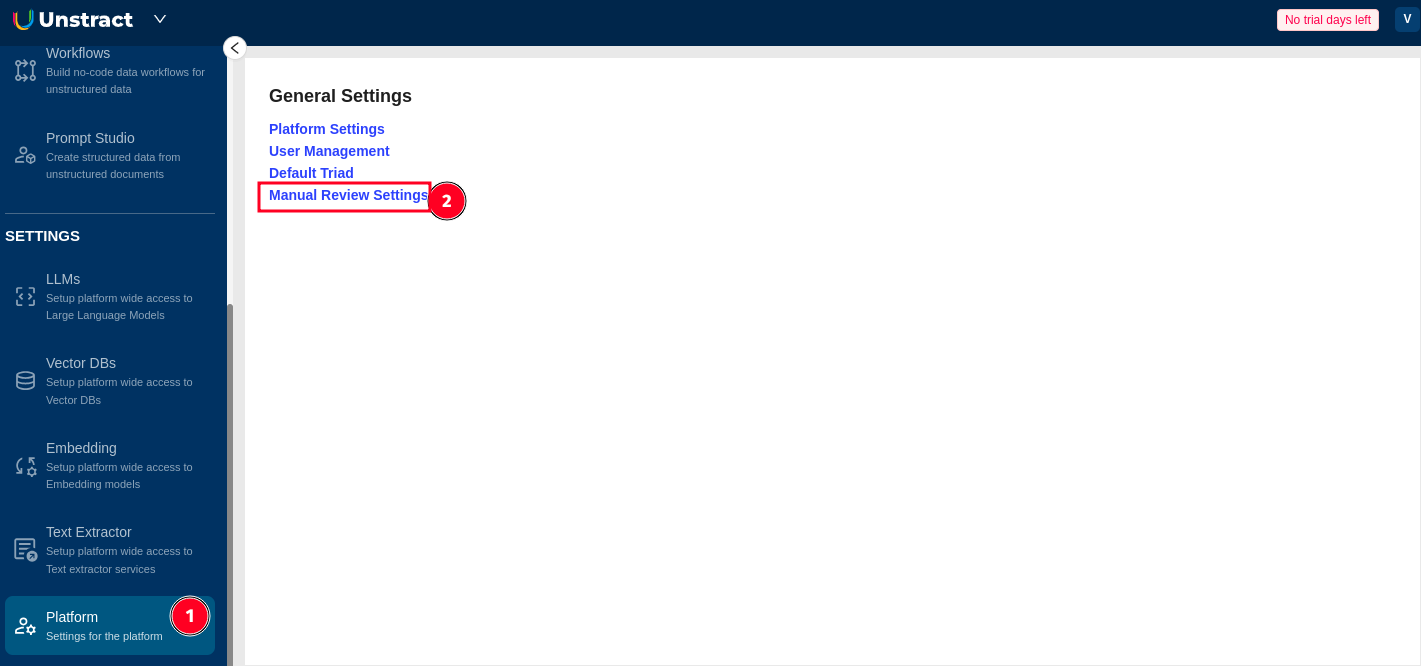
- Human Quality Review settings
- Workflow configuration page
API Key
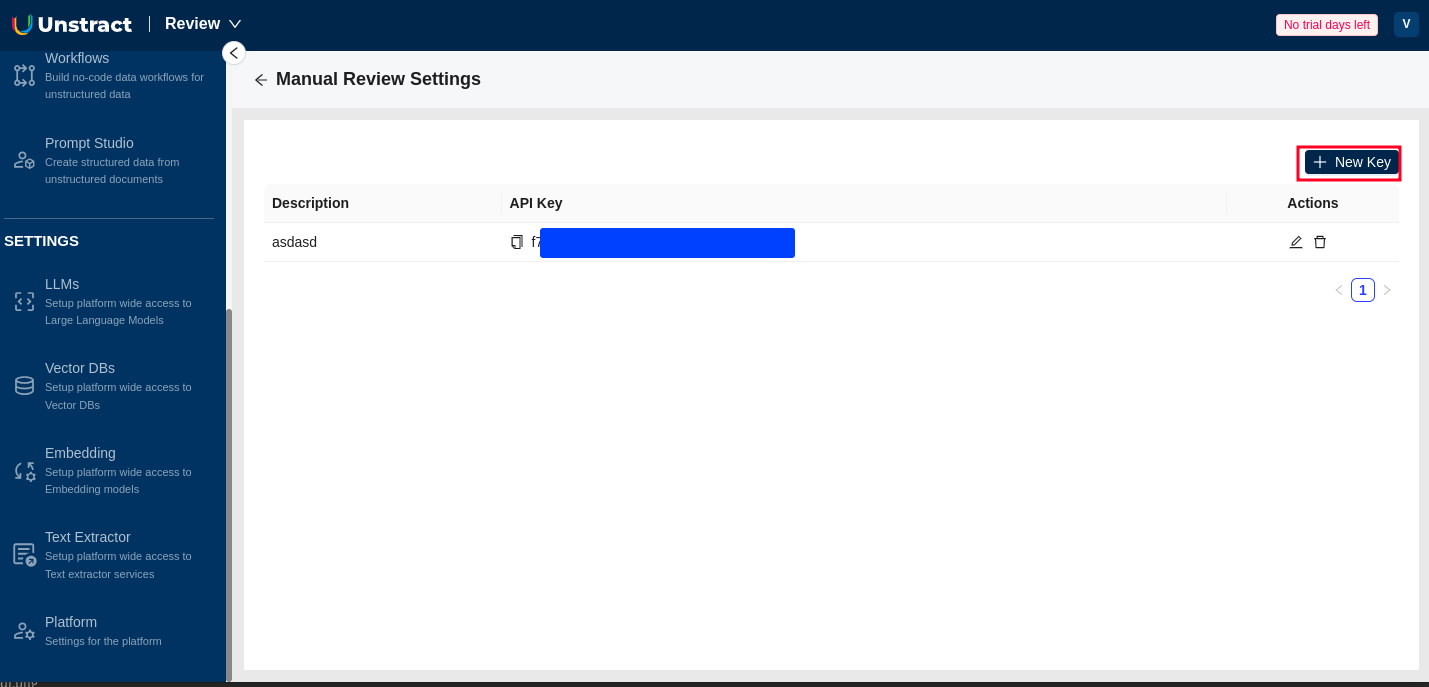
Create an API key specifically for Human Review API access:
- Navigate to Human Quality Review
- Click Create API Key
- Copy and securely store your API key
- Use this key in the
Authorization: Bearer <api_key>header
- Store API keys securely (use environment variables or secrets management)
- Never commit API keys to version control
- Rotate API keys periodically
- Revoke unused or compromised keys immediately
Class ID (Workflow ID)
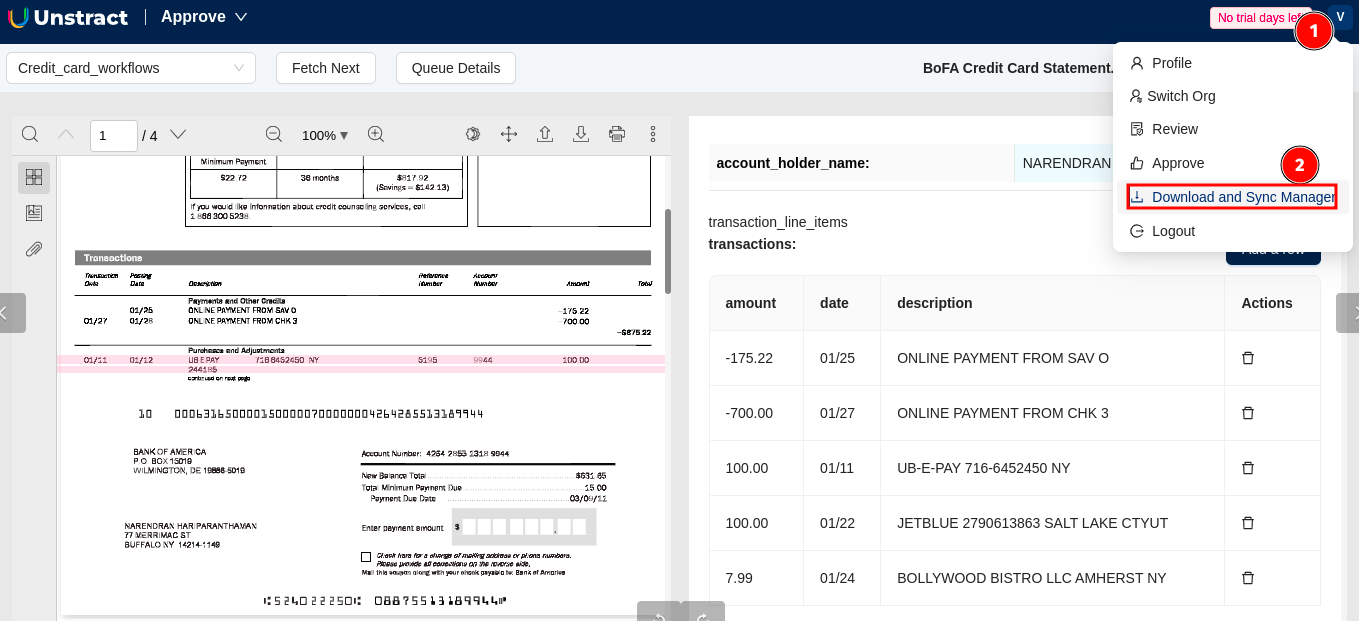
Get the class ID from the Download and Sync Manager:
- Click on Profile Icon → Download and Sync Manager
- Find your workflow in the list
- Copy the class ID (workflow ID)
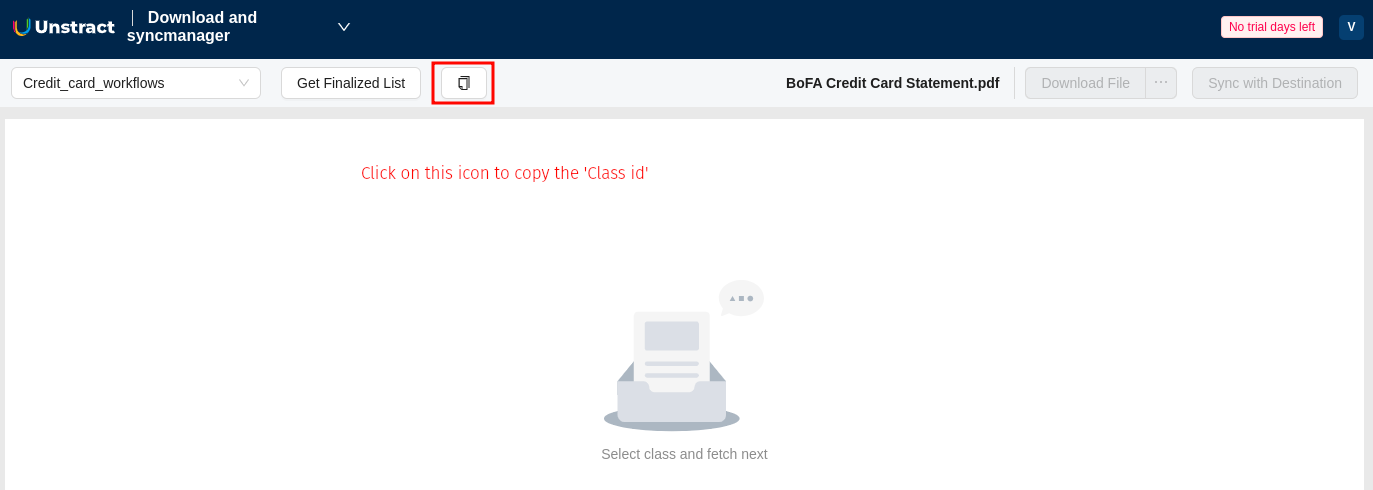
The class ID is a UUID that uniquely identifies your workflow/document class.
Response Format
The API returns a single approved document's data in JSON format.
Example Response
{
  "data": {
    "file": "invoice_2025_001.pdf",
    "status": "approved",
    "result": {
      "invoice_number": "INV-2025-001",
      "invoice_date": "2025-10-27",
      "vendor_name": "Acme Corp",
      "total_amount": "1500.00",
      "line_items": [
        {
          "description": "Software License",
          "quantity": 1,
          "unit_price": "1500.00",
          "total": "1500.00"
        }
      ]
    },
    "workflow_id": "workflow-uuid",
    "file_execution_id": "execution-uuid"
  }
}
Response Fields
| Field | Type | Description |
|---|---|---|
file | string | Original filename of the processed document |
status | string | Status of the document (typically "approved") |
result | object | The extracted and approved field values |
workflow_id | string | UUID of the workflow/document class |
file_execution_id | string | Unique identifier for this execution |
The result object contains the actual extracted data fields as defined in your Prompt Studio project. The structure will match your prompt configuration.
Integration Examples
Python Example
import requests
import os
import time

# Configuration
BASE_URL = "https://us-central.unstract.com"
ORG_NAME = "your-org-name"
CLASS_ID = "your-workflow-class-id"
API_KEY = os.environ.get("UNSTRACT_API_KEY")

def dequeue_approved_result():
    """Dequeue one approved result from HITL queue"""
    url = f"{BASE_URL}/mr/api/{ORG_NAME}/approved/result/{CLASS_ID}/"
    headers = {
        "Authorization": f"Bearer {API_KEY}"
    }

    response = requests.get(url, headers=headers, timeout=30)
    response.raise_for_status()

    return response.json()

# Process approved results continuously
def process_approved_results():
    """Continuously process approved results from the queue"""
    while True:
        try:
            result = dequeue_approved_result()
            data = result.get("data", {})

            # Process the result
            print(f"Processing file: {data.get('file')}")
            print(f"Status: {data.get('status')}")
            print(f"Extracted data: {data.get('result')}")

            # Add your processing logic here
            # ...

        except requests.exceptions.HTTPError as e:
            if e.response.status_code == 404:
                print("No more results in queue, waiting...")
                time.sleep(30)  # Wait before checking again
            else:
                print(f"Error: {e}")
                time.sleep(5)

        except Exception as e:
            print(f"Unexpected error: {e}")
            time.sleep(5)

# Start processing
process_approved_results()
Node.js Example
const axios = require('axios');

const BASE_URL = "https://us-central.unstract.com";
const ORG_NAME = "your-org-name";
const CLASS_ID = "your-workflow-class-id";
const API_KEY = process.env.UNSTRACT_API_KEY;

async function dequeueApprovedResult() {
    const url = `${BASE_URL}/mr/api/${ORG_NAME}/approved/result/${CLASS_ID}/`;

    const response = await axios.get(url, {
        headers: {
            'Authorization': `Bearer ${API_KEY}`
        },
        timeout: 30000
    });

    return response.data;
}

// Process approved results continuously
async function processApprovedResults() {
    while (true) {
        try {
            const result = await dequeueApprovedResult();
            const data = result.data || {};

            // Process the result
            console.log(`Processing file: ${data.file}`);
            console.log(`Status: ${data.status}`);
            console.log(`Extracted data:`, data.result);

            // Add your processing logic here
            // ...

        } catch (error) {
            if (error.response && error.response.status === 404) {
                console.log('No more results in queue, waiting...');
                await new Promise(resolve => setTimeout(resolve, 30000));
            } else {
                console.error('Error:', error.message);
                await new Promise(resolve => setTimeout(resolve, 5000));
            }
        }
    }
}

// Start processing
processApprovedResults();
cURL Script Example
#!/bin/bash

BASE_URL="https://us-central.unstract.com"
ORG_NAME="your-org-name"
CLASS_ID="your-workflow-class-id"
API_KEY="your-api-key"

# Dequeue and process one approved result
curl --fail --location "${BASE_URL}/mr/api/${ORG_NAME}/approved/result/${CLASS_ID}/" \
  --header "Authorization: Bearer ${API_KEY}" \
  --output result.json

# Check if request was successful
if [ $? -eq 0 ]; then
    echo "Successfully retrieved approved result"
    cat result.json | jq '.'
else
    echo "Failed to retrieve result or queue is empty"
fi
Batch Processing Script
import requests
import os
import json

BASE_URL = "https://us-central.unstract.com"
ORG_NAME = "your-org-name"
CLASS_ID = "your-workflow-class-id"
API_KEY = os.environ.get("UNSTRACT_API_KEY")

def process_batch(batch_size=10):
    """Process a batch of approved results"""
    url = f"{BASE_URL}/mr/api/{ORG_NAME}/approved/result/{CLASS_ID}/"
    headers = {"Authorization": f"Bearer {API_KEY}"}

    results = []

    for i in range(batch_size):
        try:
            response = requests.get(url, headers=headers, timeout=30)
            response.raise_for_status()
            results.append(response.json())
            print(f"Retrieved result {i+1}/{batch_size}")

        except requests.exceptions.HTTPError as e:
            if e.response.status_code == 404:
                print(f"Queue empty after {i} results")
                break
            else:
                print(f"Error on result {i+1}: {e}")
                break

    return results

# Process a batch
batch = process_batch(batch_size=10)
print(f"Processed {len(batch)} approved results")

# Save to file
with open('approved_batch.json', 'w') as f:
    json.dump(batch, f, indent=2)
Error Handling
Common Error Responses
401 Unauthorized
{
  "detail": "Authentication credentials were not provided."
}
Solution: Check that your API key is valid and included in the Authorization header.
403 Forbidden
{
  "detail": "You do not have permission to access this resource."
}
Solution: Ensure your API key has the necessary permissions for Human Review access.
404 Not Found
This typically means the queue is empty (no more approved results to retrieve).
Solutions:
- Wait for more documents to be approved
- Check that documents are being approved and sent to the queue
- Verify the class_id is correct
500 Internal Server Error
{
  "detail": "An error occurred while retrieving approved results."
}
Solution: Contact support if this persists. Check system status and logs.
Troubleshooting
No Results Returned (404 Error)
Possible Causes:
- Queue is currently empty (most common)
- No documents have been approved yet
- Workflow is configured to send results to Destination DB instead of Queue
- Class ID is incorrect
Solutions:
- Wait for documents to be approved
- Check the workflow destination configuration (should be "Queue")
- Verify documents are going through the approval process
- Confirm the class ID matches your workflow
Empty or Missing Data in Response
Possible Causes:
- Extraction failed during processing
- Document had no extractable content
- Prompts were not configured correctly in Prompt Studio
Solutions:
- Check the original document in Human Quality Review
- Review extraction logs for errors
- Verify Prompt Studio configuration
- Test the prompt with sample documents
Repeated Retrieval of Same Item
If you're seeing the same item repeatedly:
Possible Causes:
- Item is being re-enqueued due to processing failures
- Multiple consumers are reading from the same queue
Solutions:
- Ensure your processing logic completes successfully
- Check for competing consumers
- Review your queue configuration
API Timeout Errors
Possible Causes:
- Network connectivity issues
- Server under heavy load
- Queue operation taking too long
Solutions:
- Increase timeout values in your HTTP client
- Implement retry logic with exponential backoff
- Check network connectivity
- Contact support if issue persists