Prompt Studio Feedback Loop
This feature is available in Unstract Cloud Edition and Unstract On-Premise Edition.
The Prompt Studio feedback loop closes the gap between human review and prompt engineering. Every correction a reviewer makes during HITL review is recorded in the audit log, and this feature surfaces those corrections back inside Prompt Studio — right next to the prompt that produced the field.
This turns reviewer corrections into actionable feedback: the fields your reviewers fix most often are exactly the prompts worth refining.
Change Indicator on Prompt Cards
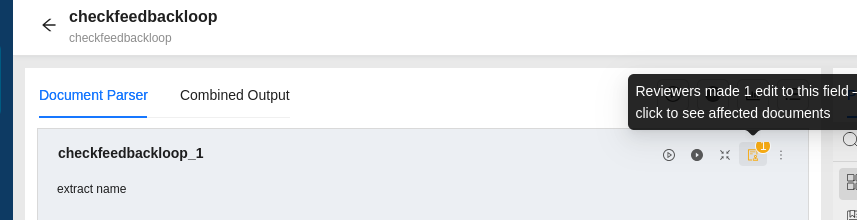
In Prompt Studio, each prompt card header shows a change indicator badge reflecting how many times reviewers have corrected that field during HITL review. The badge is tinted by volume:
| Tint | Meaning |
|---|---|
| Gray | No recorded corrections |
| Amber | 1–24 corrections |
| Red | 25 or more corrections |
Hovering the badge shows a tooltip such as "Reviewers made 1 edit to this field — click to see affected documents."
Affected-Documents Modal
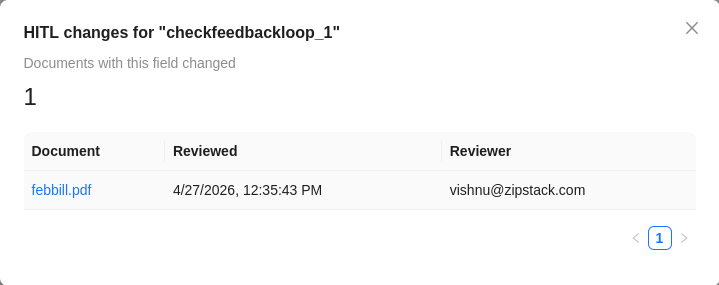
Clicking the indicator opens a modal listing the distinct documents where that field was corrected, with the file name, when it was last reviewed, and the reviewer. Each row links out to the read-only change history for that document.
Read-Only Change History
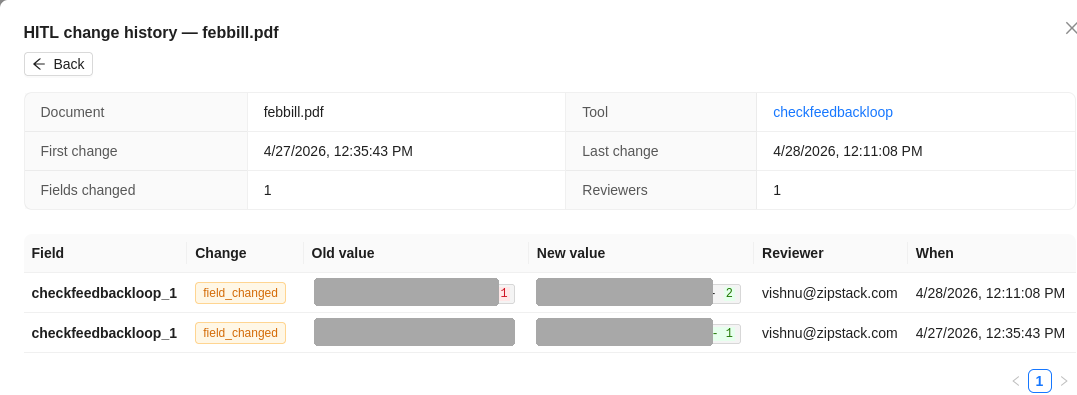
Opening a document shows a read-only audit page for that document. A summary block lists the Document, the Tool (a link back to the originating Prompt Studio project), the First and Last change timestamps, the number of Fields changed, and the Reviewers involved.
Below it, a per-field table shows the Old value → New value for each change, with inline character-level diff highlighting (removed text marked in red on the old value, added text in green on the new value) so the exact correction is obvious at a glance.
Corrections are currently matched by field name. If the same prompt key is used across more than one project, their counts are aggregated together. In practice prompt keys are unique per project, so the count reflects that prompt in the common case.
Related Documentation
- Change Tracking & Audit Logs — the audit data that powers this feedback loop
- Setting up HITL ETL